
| Check here for a live demo. Here at Handle the Bucket, we handle your buckets. We equip needs with know-how, wants with what-for, hows to how-tos. Usually that mission is expressed by connecting you with a variety of early 20th century Spanish poetry, but today our handle is -- flash cards! Other flash card programs disappointed me. Why were my specific preferences not considered by any of the free programs I tried? How am I supposed to read Arabic in their tiny font? Why can I not access it from any web browser? Why can the answer not be an image? All good questions, I told myself. Important considerations were being ignored by these magnanimous ne'erdowells, these free flashcard phonies. So I made my own. Below are the setup steps and all the code. Just remember: this is the premier free flash card program of Southern New England, and our business model anticipates penetration of the entire free Google sheets flash card market by or after the termination of the Google drive program. So tell your friends! Product Spec.png)
Not surprisingly, the nearly achromatic luster has sucked you in. Follow the steps below to make your own set of flash cards. As you progress, you will be rewarded.
To get things started, here is earned your first gray sticker! We'll start with the database...
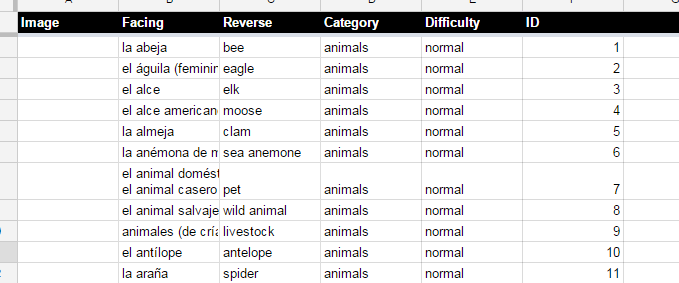
Woohoo! You've earned your second gray sticker!
With the database done, we can move onto the code...
Congratulations, you've earned your third gray sticker!
And finally, we add the client-side code!
Now you are the coolest son-of-a-gun to have ever read this blog!
Head on back to your spreadsheet and add some more tabs and cards....and though, you don't get another now, marvel at your mighty mass of gray stickers! |
Showing posts with label Other Writing. Show all posts
Showing posts with label Other Writing. Show all posts
Thursday, December 4, 2014
Wednesday, January 22, 2014
What? Circles and Squares on the Cat-Walk? When?!
Below is a review of Antonio Forte's show, Circles and Squares. Running until 2/28.
His opening night at the Artist's Exchange in Cranston left most people wondering, what can we do with such a man?

My favorite piece though was "Music for Moths, Part II," a couple dozen moths strung over and wired into an old pink piano. At one point a boy came to it and began to press the keys. He was disappointed at first that the moths wouldn't flap, so he pounded harder and harder until they were all jittering and dancing, the piano was shaking and people were laughing.
Well done Mr. Forte. You made an avante-garde of us all. And with just some string, wire and canvas, no less.

His opening night at the Artist's Exchange in Cranston left most people wondering, what can we do with such a man?
For me, art is. Period. But for Mr. Antonio Forte art is becoming: a painting spun by a clock, coffee grounds that percolated a musical score, secret creatures exploring secret landscapes.
--
My favorite piece though was "Music for Moths, Part II," a couple dozen moths strung over and wired into an old pink piano. At one point a boy came to it and began to press the keys. He was disappointed at first that the moths wouldn't flap, so he pounded harder and harder until they were all jittering and dancing, the piano was shaking and people were laughing.
Well done Mr. Forte. You made an avante-garde of us all. And with just some string, wire and canvas, no less.
He tricked, guided, danced us into self expression. He confounded us, excited us, inflamed us, entertained us, and in the experience we found ourselves pleased, and surprised to be so. His work doesn't always go down easy but no matter how hard it clangs or convexes, there's always a veneer of something captivating that I can only explain as the artist himself. A quirky melancholy? A mad playfulnesss? A childish refinement maybe?

Perhaps in the end, shwaddle shweeple shwaileetu is the best compliment I can give to artist Antonio Forte, a worthy caretaker of circles and squares. See them if you can.

Sunday, December 15, 2013
Yodeling Yokels and Jokels
I normally trust NPR, but I was dubious when someone answered the question, what is a yokel?
Everybody on the program knew a "yokel" was a bumpkin, but nobody knew its origin. "Does it have to do with an ox yoke?" they asked, "Most yokels are farmers." "Or is it related to the yoke of an egg -- they are often used by yokels as hats, no?" Well in fact, the correct answer is much more esoteric: "It is imitative of the green woodpecker of Wales, which announces itself with a loud, 'Yoo-kiil, yoo-kiil.'"
It's cogent. Yokels do live far away from society, tend to fly about in the clouds, and often jab for their food rostrally. Hell, sometimes they even yodel.
Such is what I thought until I remembered Cletus, the slack-jawed yokel. Consider Cletus' smooth drawl.

No slack-jaw can yokel.
Everybody on the program knew a "yokel" was a bumpkin, but nobody knew its origin. "Does it have to do with an ox yoke?" they asked, "Most yokels are farmers." "Or is it related to the yoke of an egg -- they are often used by yokels as hats, no?" Well in fact, the correct answer is much more esoteric: "It is imitative of the green woodpecker of Wales, which announces itself with a loud, 'Yoo-kiil, yoo-kiil.'"
It's cogent. Yokels do live far away from society, tend to fly about in the clouds, and often jab for their food rostrally. Hell, sometimes they even yodel.
Such is what I thought until I remembered Cletus, the slack-jawed yokel. Consider Cletus' smooth drawl.
No slack-jaw can yokel.
Tuesday, December 10, 2013
Salt: Good Marriage and Tasty Foreplay
A Presentation from Father Patrick, the Hypertensive Friar.
As Mr. Zeff has just described, atoms often have an unequal number of protons and electrons. When there are more protons, the atom will attract electrons, and conversely, when an atom has more electrons it will attract protons.
But to be clearer, let’s put some faces on it. Say you’ve got an atom with 17 protons, who just nabbed another electron to fill out his shell. Let’s call him Chlorine.
Chlorine’s confident because while he knows he’s a bit negative, he is nevertheless attractive. In fact, his imperfection is his attraction: one cannot be attractive without some nuance, some special imperfect flare. He’s got that spark that someone would love to fix.
Cue Sodium. She’s got 11 of the most curvaceous protons around, and she’s looking awfully trim with just 10 valence electrons. She’s got her faults, true, but she’s positively charming.
Every bit of Chlorine bumps and shakes. Yes, yes, yes, jump her, jump her, jump her, he thinks as he floats to her on a river of his own drool. And then tasty stuff goes down! Chloe’s electrons reach over and pull on Sodium’s protons, and Chloe’s protons start jigglin Sodium’s electrons. Oh! Behave you two! This is foreplay that might last awhile...
The truth is this sodium and chlorine bond will likely stay together longer than most real marriages. Better still, it will spread. Other NaCl couples, attracted by their love, will move in nearby and form a pretty suburb. It’s will be a spacious place, free from impropriety, and though all the Sodiums are attracted to the Chlorines, and the Chlorines are attracted to the Sodiums, every couple remains faithful.
This is why I coat my steaks in salt: in the hopes of inspiring uniform sexual fidelity! Divine ordinance has made salt the most sacred of seasonings!
As Mr. Zeff has just described, atoms often have an unequal number of protons and electrons. When there are more protons, the atom will attract electrons, and conversely, when an atom has more electrons it will attract protons.
But to be clearer, let’s put some faces on it. Say you’ve got an atom with 17 protons, who just nabbed another electron to fill out his shell. Let’s call him Chlorine.
Chlorine’s confident because while he knows he’s a bit negative, he is nevertheless attractive. In fact, his imperfection is his attraction: one cannot be attractive without some nuance, some special imperfect flare. He’s got that spark that someone would love to fix.
Cue Sodium. She’s got 11 of the most curvaceous protons around, and she’s looking awfully trim with just 10 valence electrons. She’s got her faults, true, but she’s positively charming.
Every bit of Chlorine bumps and shakes. Yes, yes, yes, jump her, jump her, jump her, he thinks as he floats to her on a river of his own drool. And then tasty stuff goes down! Chloe’s electrons reach over and pull on Sodium’s protons, and Chloe’s protons start jigglin Sodium’s electrons. Oh! Behave you two! This is foreplay that might last awhile...
---
Hah! I jest,
But blessed be this union, this marriage!
Theirs is a bond based on affection.
What is a soul-mate but a complement
for our lesser imperfections?
---
The truth is this sodium and chlorine bond will likely stay together longer than most real marriages. Better still, it will spread. Other NaCl couples, attracted by their love, will move in nearby and form a pretty suburb. It’s will be a spacious place, free from impropriety, and though all the Sodiums are attracted to the Chlorines, and the Chlorines are attracted to the Sodiums, every couple remains faithful.
This is why I coat my steaks in salt: in the hopes of inspiring uniform sexual fidelity! Divine ordinance has made salt the most sacred of seasonings!
Friday, December 6, 2013
Shel Silverstein
The easiest thing to say is that he was complicated. Still easier is that he was simple.
Early on, Shel wrote mostly for Playboy. His first paychecks for cartooning were from Mr. Hefner, and they motivated him to go full time.
He ignored his children. Their mother (not his wife) died of cancer, and they went to live with an aunt and uncle. His daughter died some 6 years later from a brain aneurysm.
He didn't want to do children's books at first. They dragged him into it because the pay was real, but listen to songs like The Unicorn. Really Shel, you can't see it?
He served in the Korean War, and he loved women; he lived as a recluse, refused interviews and decried schooling. He was opinionated, stubborn and vulgar.
But he was a man who knew what he wanted and how to say it plainly. Blessed art thou, Shel.

Can you babysit Friday?
Additional Reading:
On Vibrators: http://www.pinterest.com/petemayhem/uncle-shelby-s-abz-book/
On Bad Influence: http://songmeanings.com/songs/view/3530822107858580683/
On Women's Liberation: http://crazcowboy.tripod.com/Silverstein/lady1999.htm
Early on, Shel wrote mostly for Playboy. His first paychecks for cartooning were from Mr. Hefner, and they motivated him to go full time.
He ignored his children. Their mother (not his wife) died of cancer, and they went to live with an aunt and uncle. His daughter died some 6 years later from a brain aneurysm.
He didn't want to do children's books at first. They dragged him into it because the pay was real, but listen to songs like The Unicorn. Really Shel, you can't see it?
He served in the Korean War, and he loved women; he lived as a recluse, refused interviews and decried schooling. He was opinionated, stubborn and vulgar.
But he was a man who knew what he wanted and how to say it plainly. Blessed art thou, Shel.
Can you babysit Friday?
Additional Reading:
On Vibrators: http://www.pinterest.com/petemayhem/uncle-shelby-s-abz-book/
On Bad Influence: http://songmeanings.com/songs/view/3530822107858580683/
On Women's Liberation: http://crazcowboy.tripod.com/Silverstein/lady1999.htm
Tuesday, December 3, 2013
Cowboy Zeff, Atomic Theorist
Never forget you: Atoms are a chaos, not 'cause they ain’t got rules, but 'cause they got too many.
Every proton attracts an electron, and every electron attracts them a proton; positive ta negative, negative ta positive. Now, let us say there is an atom with nine protons. These nine little balls of positivity should attract them nine electrons, right? One positive fer each negative.
But that ain’t what happens! Nine protons attract 10 electrons. You thinkin: Zeff! That’s balderdash; you raving distracted!
Every proton attracts an electron, and every electron attracts them a proton; positive ta negative, negative ta positive. Now, let us say there is an atom with nine protons. These nine little balls of positivity should attract them nine electrons, right? One positive fer each negative.
But that ain’t what happens! Nine protons attract 10 electrons. You thinkin: Zeff! That’s balderdash; you raving distracted!
I sayyun you that you don’t understand the atom nor its structure! First, a proton ain’t never “neutralized.” It’s always gonna attract electrons; it’s just that in most cases electrons around the atom are gonna repel any electrons that happen to be coming nearby. But iffin an electron gets close enough to the protons, well, it would be electrically stuck just like all the other 9.
But why, Zeff, can an electron get close enough sometimes, but not at other times? Well, that’s the question, and let me learn you the answer. When electrons go around a proton, they make a shell. Like a nut. If you put two electrons around a mass of protons, their gonna make a shell. Like a nut. Now imagine another shell around that nut. That’s what happens when you add 8 more electrons to that mass of protons. And you can keep adding electrons, and, iffin there are enough protons to keep them doggies wrangled, they’re gonna make bigger and bigger shells.
Now, iffin you only have a few protons in the center, they ain’t never gonna finish that second shell. 4 of them cowboys ain’t gonna herd 10 cattle, let alone any in a far-off shell; by golly, 10 protons ain’t strong enough to hold on to any in the next shell. But 9 protons can hold on to another one because there's a "hole in the shell." And iffin when that stray electron wanders into that “hole in the shell,” so to speak, well them 9 cowboys are gonna wrangle some extra meat.
That’s why I was saying atoms are crazy as loons, cause 9 gets 10 and 10 gets 10. And, by good rites, no 9 jackeroos shouldn’t ever have as many as 10. I’m always saying, society’s rules just ain’t for me.
For more fun cowboy words, click there!
But why, Zeff, can an electron get close enough sometimes, but not at other times? Well, that’s the question, and let me learn you the answer. When electrons go around a proton, they make a shell. Like a nut. If you put two electrons around a mass of protons, their gonna make a shell. Like a nut. Now imagine another shell around that nut. That’s what happens when you add 8 more electrons to that mass of protons. And you can keep adding electrons, and, iffin there are enough protons to keep them doggies wrangled, they’re gonna make bigger and bigger shells.
Now, iffin you only have a few protons in the center, they ain’t never gonna finish that second shell. 4 of them cowboys ain’t gonna herd 10 cattle, let alone any in a far-off shell; by golly, 10 protons ain’t strong enough to hold on to any in the next shell. But 9 protons can hold on to another one because there's a "hole in the shell." And iffin when that stray electron wanders into that “hole in the shell,” so to speak, well them 9 cowboys are gonna wrangle some extra meat.
That’s why I was saying atoms are crazy as loons, cause 9 gets 10 and 10 gets 10. And, by good rites, no 9 jackeroos shouldn’t ever have as many as 10. I’m always saying, society’s rules just ain’t for me.
For more fun cowboy words, click there!
Tuesday, November 26, 2013
Subatomic Particles: A Tragic Love Story
An atom is uncuttable. Literally, “uncuttable.”
Atoms, just like the rest of us though, are thralled by what’s inside. There are “little bits beneath the uncuttable” (literally, subatomic particles) that not only exist, but whose attraction makes everything. It’s a nanoscopic courtship -- the protons and electrons, pulling and pushing, tugging and running at each other.
This is not poetic rambling! I am not fantasizing from the reality of positive and negative charges. There is no positive and negative; there is no charge! These categories enervate what we really see: a longing between two little bits, making it work, alone beneath the “uncuttable.” Believe! They exist and they love!
Watch as the electron picometers towards the proton. It shakes as it gets close. Poised on the edge, an electric chaos, jittery beyond physics. They never touch.
Oh, this is a universe of tease.
Atoms, just like the rest of us though, are thralled by what’s inside. There are “little bits beneath the uncuttable” (literally, subatomic particles) that not only exist, but whose attraction makes everything. It’s a nanoscopic courtship -- the protons and electrons, pulling and pushing, tugging and running at each other.
This is not poetic rambling! I am not fantasizing from the reality of positive and negative charges. There is no positive and negative; there is no charge! These categories enervate what we really see: a longing between two little bits, making it work, alone beneath the “uncuttable.” Believe! They exist and they love!
Watch as the electron picometers towards the proton. It shakes as it gets close. Poised on the edge, an electric chaos, jittery beyond physics. They never touch.
Oh, this is a universe of tease.
Wednesday, November 20, 2013
Praziquantel: Tapeworm Medication or Aztec God?
In truth, Praziquantel is tapeworm medication. Its name is from a chemical compound (pyrazine) mashed with a couple other science words - quinoline (an oil from coal tar) and anthelmintic (worm-less). But how far from a Aztec god is a worm killer? To a tapeworm, Praziquantel is a god from tar pits and death...

...Then the Werms traveled, and fell into the stomach of Eden. Waterfalls of digested food; friendly enzyme butlers cozying up with trays of sugar morsels -- a heaven for any German worm. But this was a heaven that needed placation, and ignorant, the family grew. They drained the land, until the land became unwell and, one day, an angry Praziquantel descended.
It probably started slow. The worms felt a tingle; there was a creaking joint, a chill in the bile. Their bodies became uncomfortably stiff and then all was sour, and the mood became contagious. Grime, waves of emptiness, rustle. Friendly enzymes became distant.
And soon frenzied. A thousand friendly eyes narrowing.
Teeth notch and lips drip.
The Werms lived on a muffin. They had no digestive systems, and their world was unpalatable and cold. A fallow planet of dirty muffin.
...Then the Werms traveled, and fell into the stomach of Eden. Waterfalls of digested food; friendly enzyme butlers cozying up with trays of sugar morsels -- a heaven for any German worm. But this was a heaven that needed placation, and ignorant, the family grew. They drained the land, until the land became unwell and, one day, an angry Praziquantel descended.
It probably started slow. The worms felt a tingle; there was a creaking joint, a chill in the bile. Their bodies became uncomfortably stiff and then all was sour, and the mood became contagious. Grime, waves of emptiness, rustle. Friendly enzymes became distant.
And soon frenzied. A thousand friendly eyes narrowing.
Teeth notch and lips drip.
An ocean of acidic teeth.
Drowns every molecule.
0:00, Healthy round worm
0:05, Helical paralysis
0:08, Herniating rupture
0:05, Helical paralysis
0:08, Herniating rupture
Tough hat.
Friday, November 15, 2013
On Cow-Blood Candy, Children Coloring
"Hematogen" is a popular candy in Russia. It is sugar, milk, vanilla, and cow blood.
Literally, the name means "the origin of blood," and it doubles as medication for anemics (the bloodless). Blood to the bloodless, I've always said.
But with any medication there are risks. Hematogen can cause colored-blood (Hemochromatosis), a disease of excessive iron. Europeans are more likely to have genetic issues that cause this disease.
Odd they give this candy to Russian children then. Blood to the bloodless, okay; blood to children with colored-blood...
Hematogen is bloody rust on the reds.
Literally, the name means "the origin of blood," and it doubles as medication for anemics (the bloodless). Blood to the bloodless, I've always said.
But with any medication there are risks. Hematogen can cause colored-blood (Hemochromatosis), a disease of excessive iron. Europeans are more likely to have genetic issues that cause this disease.
Odd they give this candy to Russian children then. Blood to the bloodless, okay; blood to children with colored-blood...
Hematogen is bloody rust on the reds.
Friday, November 1, 2013
1,000,000,000,000,066,600,000,000,000,001
To be read in an English accent
This is Belphegor's prime. It is a palindrome, and comprised of the most evil number, 666, flanked by the unluckiest number, 13, of zeros on either side.
It is also a prime number.
It is so crafted, almost contrived, and yet -- because it is prime -- seems dangerously organic. The question: Why does this number -- that so perfectly coincides with our fears -- have such distinction, such natural numeric beauty? Why does it exist? Why is it terrifying?
13 is pervasively fearful, though we don't know why. 6 is just as feared, and has always beenn. Many ancients (from the Hebrews to the Celts) thought six to be quintessentially imperfect, as opposed to seven the perfect number. But why? No reason but natural fear.
Some may credit 666 as the "Number of the Beast" in the Book of Revelations, and claim that's why we fear it. However, this is not the root cause. The beast is a symbol for Emperor Nero -- a dictator most psychotic. The author of Revelations merely attached the number, already considered infernal, to the emperor. Thus 666 is a more like an infernal dunce cap for the beast, rather than the origin of our hexaphobia.*

Like the constituent numbers, the name, "Belphegor's prime," carries frightful mystery. Who is Belphegor and why is this his number? We may research, but there is no reason! In fact, Belphegor is but a silly demon who lures people by laziness and greed into get-rich-quick schemes and sex orgies. He has as much to do with number as a hairy turnip.
The lacking certainties of this case are dizzying. Why does this prime number exist? Why is it fearful? Why is it named after a greedy little, horny demon bugger? The best one can determine, I think, is that the name might come from John's Milton's epic work Paradise Lost. Milton introduces Belphegor** as "the prime of principalities." Perchance some mathematician might have noticed the moniker and the number. However, if the only glancing explanation of the number and its elements is this -- that the name is a pun -- then, good lord:
It would be a true nightmare.
*Hebraic letters double as numbers, and Nero's name does add to 666. But this astonishing coincidence is just what gave the author the idea in the first place. Like 6 and 13, 666, a mystery, remains.
** Milton uses the pseudonym Nisroc.
This is Belphegor's prime. It is a palindrome, and comprised of the most evil number, 666, flanked by the unluckiest number, 13, of zeros on either side.
It is also a prime number.
It is so crafted, almost contrived, and yet -- because it is prime -- seems dangerously organic. The question: Why does this number -- that so perfectly coincides with our fears -- have such distinction, such natural numeric beauty? Why does it exist? Why is it terrifying?
13 is pervasively fearful, though we don't know why. 6 is just as feared, and has always beenn. Many ancients (from the Hebrews to the Celts) thought six to be quintessentially imperfect, as opposed to seven the perfect number. But why? No reason but natural fear.
Some may credit 666 as the "Number of the Beast" in the Book of Revelations, and claim that's why we fear it. However, this is not the root cause. The beast is a symbol for Emperor Nero -- a dictator most psychotic. The author of Revelations merely attached the number, already considered infernal, to the emperor. Thus 666 is a more like an infernal dunce cap for the beast, rather than the origin of our hexaphobia.*

No wonder he's so angry.
Like the constituent numbers, the name, "Belphegor's prime," carries frightful mystery. Who is Belphegor and why is this his number? We may research, but there is no reason! In fact, Belphegor is but a silly demon who lures people by laziness and greed into get-rich-quick schemes and sex orgies. He has as much to do with number as a hairy turnip.

The lacking certainties of this case are dizzying. Why does this prime number exist? Why is it fearful? Why is it named after a greedy little, horny demon bugger? The best one can determine, I think, is that the name might come from John's Milton's epic work Paradise Lost. Milton introduces Belphegor** as "the prime of principalities." Perchance some mathematician might have noticed the moniker and the number. However, if the only glancing explanation of the number and its elements is this -- that the name is a pun -- then, good lord:
It would be a true nightmare.
*Hebraic letters double as numbers, and Nero's name does add to 666. But this astonishing coincidence is just what gave the author the idea in the first place. Like 6 and 13, 666, a mystery, remains.
** Milton uses the pseudonym Nisroc.
Subscribe to:
Posts (Atom)